42-friends
42 Friends 👥
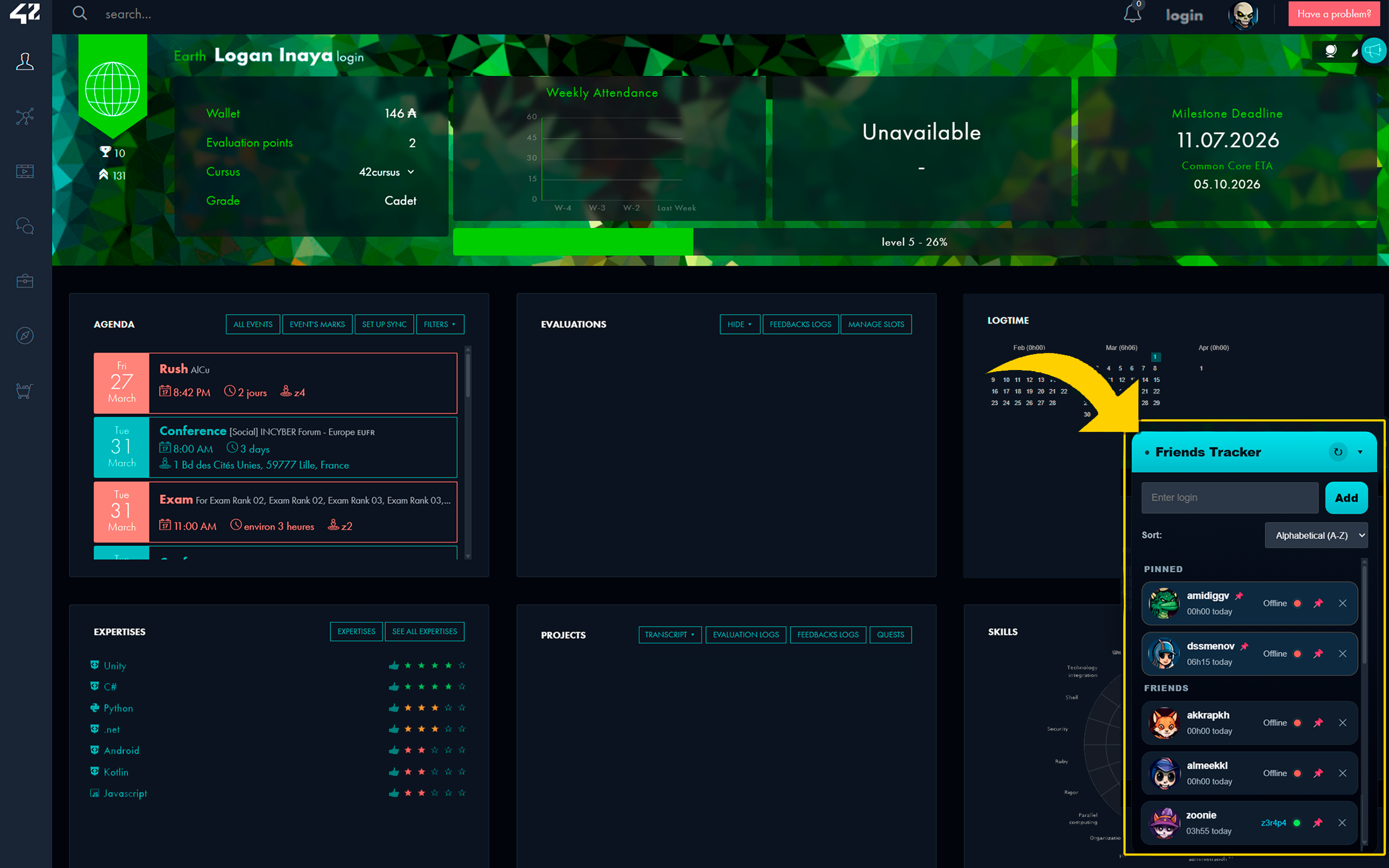
A browser extension for the 42 intra that adds a floating friends tracker overlay, making it easier to follow your friends directly from the intra interface.
It currently provides a clean floating panel with friend management, quick profile access, pinned friends, sorting options, cache-based loading, and profile page integration.
✨ Features
- Floating friends overlay available on the 42 intra
- Add and remove friends from your custom list
- Pin important friends to keep them at the top
-
Sort friends by:
- Alphabetical (A-Z)
- Alphabetical (Z-A)
- Online First
- Offline First
- Quick access to friend profiles
- Cluster location shortcut when a friend is online
- Hover profile card with basic user info
- Profile page button to add or remove a friend directly
- Cached friend data for faster loading
- Synced friend list via browser storage
🖼️ Overview
42 Friends enhances the 42 intra with a floating tracker panel that stays accessible while browsing the platform.
The extension is designed to make it easier to:
- keep track of your friends
- see who is online
- jump to their profile quickly
- organize important contacts with pins and sorting
📦 Installation
Chrome / Chromium-based browsers
-
Clone or download this repository
-
Install dependencies:
npm install -
Build the extension:
npm run build -
Open:
chrome://extensions -
Enable Developer mode
-
Click Load unpacked
-
Select the
build/folder -
Open the 42 intra and use the extension
🚀 Development
Install dependencies:
npm install
Run a production build:
npm run build
Run in watch mode:
npm run watch
Local workflow
- Edit the source files
- Run
npm run buildornpm run watch - Reload the extension in your browser
- Test the updated version on the 42 intra
🏗️ Build Output
The final extension package is generated in:
build/
This folder contains the full unpacked extension package, including:
manifest.json- built scripts
- icons
- required static assets
Use the build/ folder for:
- local unpacked loading
- release packaging
- store upload preparation
🧩 Project Structure
42-friends/
├── build/              # Final built extension package
├── icons/              # Extension icons
├── src/                # Source files
├── manifest.json       # Source manifest
├── build.js            # Build script
├── package.json
└── README.md
The exact internal source structure may evolve as the extension grows.
🔐 Permissions
The extension currently uses browser storage and 42 intra-related host permissions in order to:
- save your friend list
- sync preferences
- load profile-related data from the 42 intra
- show online/location-related information
🛠️ Versioning
The project uses a single source of truth for versioning:
package.jsonis the main version source- the manifest version is synchronized automatically during build
So when preparing a new release, you only need to update the version in package.json.
📌 Notes
- The extension is intended for use on the 42 intra
- The unpacked development version should be loaded from the
build/folder, not from the project root - After making changes, remember to reload the extension in the browser
🤝 Contributing
Suggestions, improvements, and feedback are welcome.
If you want to improve the extension:
- fork the repository
- make your changes
- test them on the 42 intra
- open a pull request